.png)
Quiz Round Instructions
Before You Start
Log in early: Please log in to the portal at least 10 minutes before the scheduled start time. Before beginning the test, you must watch a required instructional video.
Important: If you miss your designated testing time for your time zone, you will NOT be permitted to take the test at a different time.
Having technical difficulties? Get support.
Open each section below to watch the video and read the full instructions.
1. Find Your Test and Time Where · Time · Testing region
Where:
Log into the competition portal from https://app.algoed.co/login and go to My Competitions. You will find the competition under Preliminary Round, with the test time displayed in your registered time zone.
.png)

Time:
Your test time has been scheduled based on the country specified by your "team leader" at the time of your team's creation. This selection should correspond to the country where your school is based.
Please review the competition portal under "Your Team" to verify that your country selection is correct.
Check which region your country belongs to here:
Find Your Testing Region
Select your school's country/region to see its testing region.
Check the competition portal for your test time in your registered time zone.
View All Countries and Testing Regions
| Testing region | Countries and territories |
|---|---|
| Asia Pacific |
|
| Europe, Middle East, Africa |
|
| North America, South America |
|
2. Set Up Your Device and Proctoring Video · Device requirements · Cameras · Materials · Practice test · Consent
Technology Requirements
- Stable Internet Connection: A reliable internet connection is essential. Please ensure your connection is stable throughout the test.
- Computer Requirement: The test must be taken on a laptop or desktop computer with a camera. It is not optimized for mobile devices, so avoid using phones or tablets. Remember your face must be clearly visible at all times.
- Browser: Make sure your browser is updated to the latest version to ensure a smooth experience.
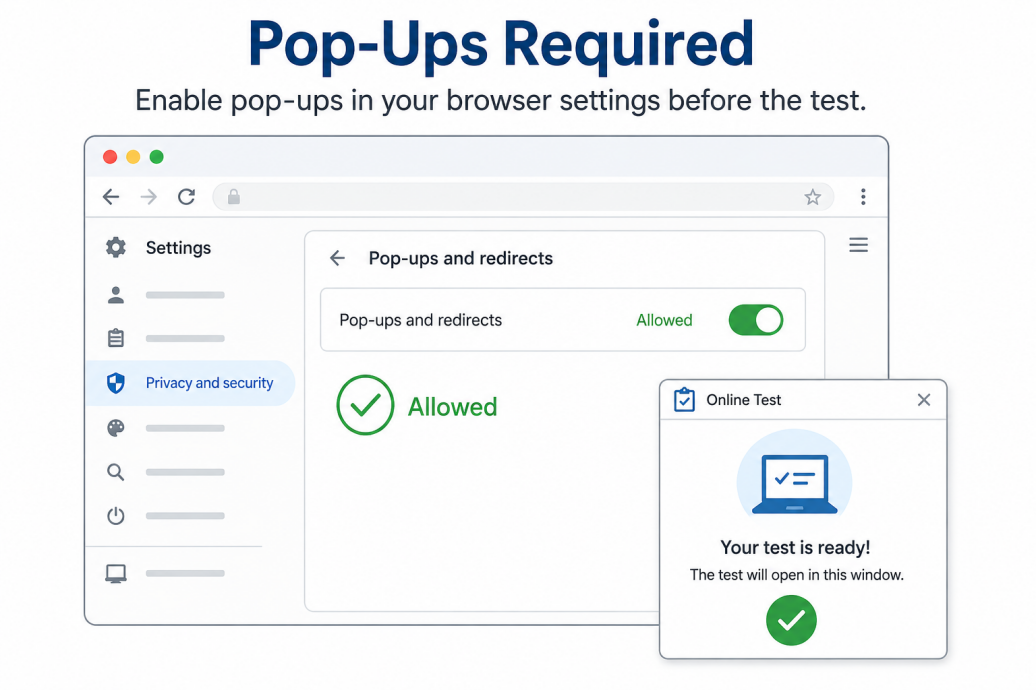
- Pop-Up Required: Make sure that pop-ups are enabled in your browser settings.
Proctoring Requirements
To ensure fairness and integrity, all students must follow one of the two approved proctoring options. Please read carefully and choose the option that applies to you.
Option 1: Camera On (Default Method)
Two-camera Setup Recommended: Your front-facing camera must remain on throughout the entire test and be positioned to clearly show your face. A second camera is optional but recommended. If used, position it behind you so that it clearly shows your computer screen, keyboard, hands, and desk.
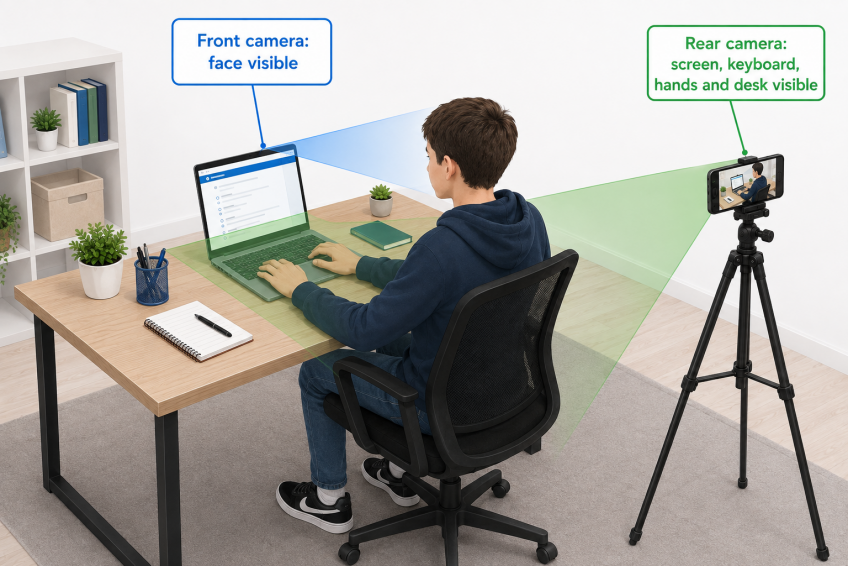
- Face Visible: Keep your face clearly visible at all times.
- Breaks: You may step away briefly (e.g., bathroom or water breaks), but your camera must stay on.
- Recording Policy: Test sessions are recorded only to check for irregularities or unfair practices. Recordings are never shared or used for any purpose beyond test security.
- Recording Data Retention: Recordings are reviewed by our proctoring team and permanently deleted within 14 days after the test.
- Camera Compliance: If the front camera is turned off or fails to provide the required view at any time during the test, you may be disqualified. If you experience technical difficulties with either camera, email support@algoed.co immediately after completing the test and explain what occurred. Score penalties may still apply depending on the duration and circumstances of the disruption.
Option 2: Teacher Proctoring (Alternative)
We understand that a small number of students may not wish to be recorded. In such cases, you may choose teacher-supervised in-person proctoring.
To set this up, your teacher must email support@algoed.co from their official school email address at least one day before the test to confirm the teacher will take responsibility as your proctor.
What to Bring
- Calculator: You are permitted to use a physical calculator during the test. Graphing calculators are not allowed. Please also avoid using online calculators, as this may trigger our cheating detection system.
- Scratch paper: You are allowed to use blank scratch paper for rough work and calculations.
- Pen or pencil
Practice Test
The practice test is available on the competition portal, below "Invite Team Members"
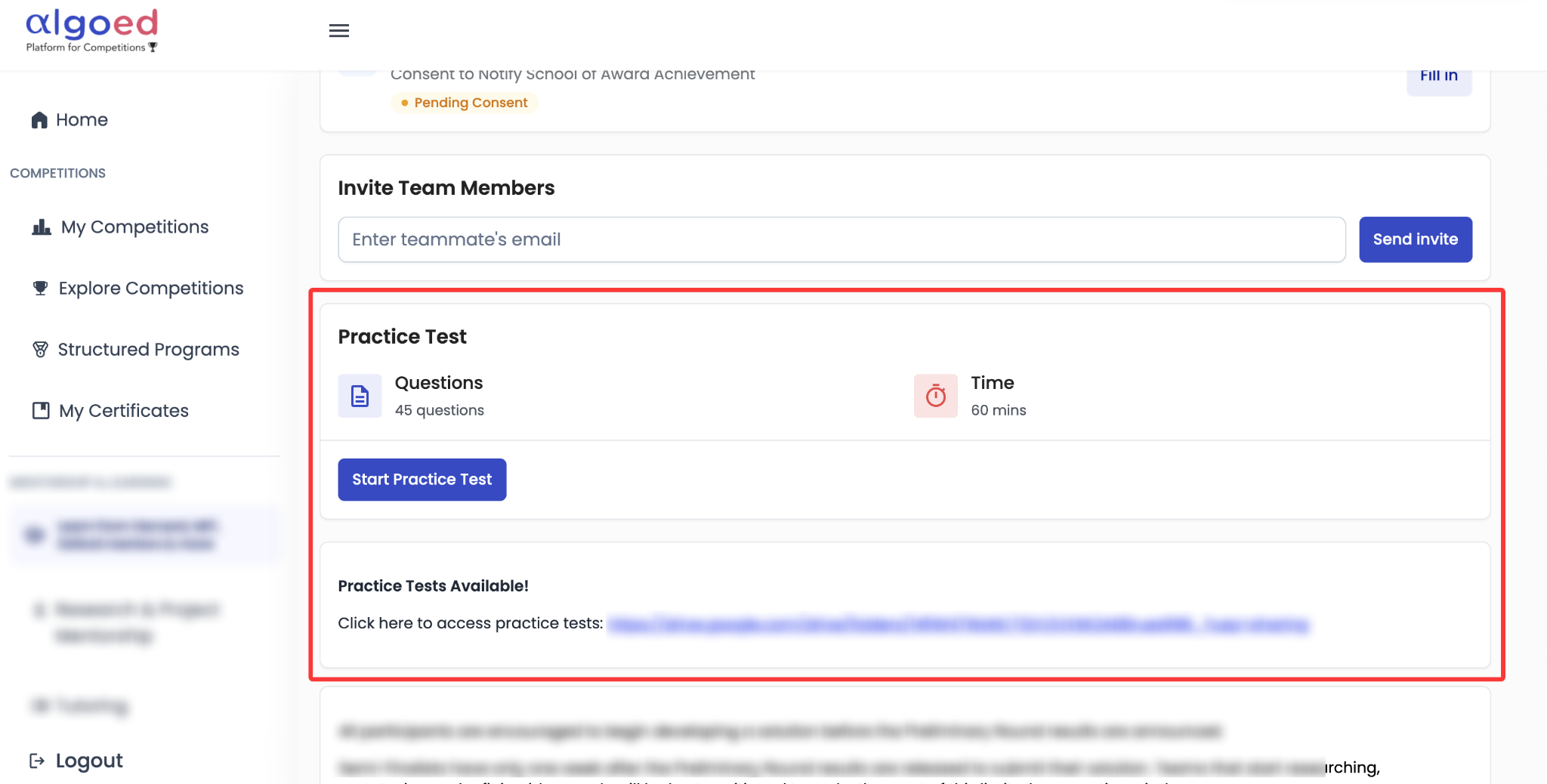
The practice test's portal's design will be identical to the actual test. Please explore the interface, test the buttons, and familiarize yourself with the system to ensure a smooth experience on test day.
Consent to Notify School of Award Achievement
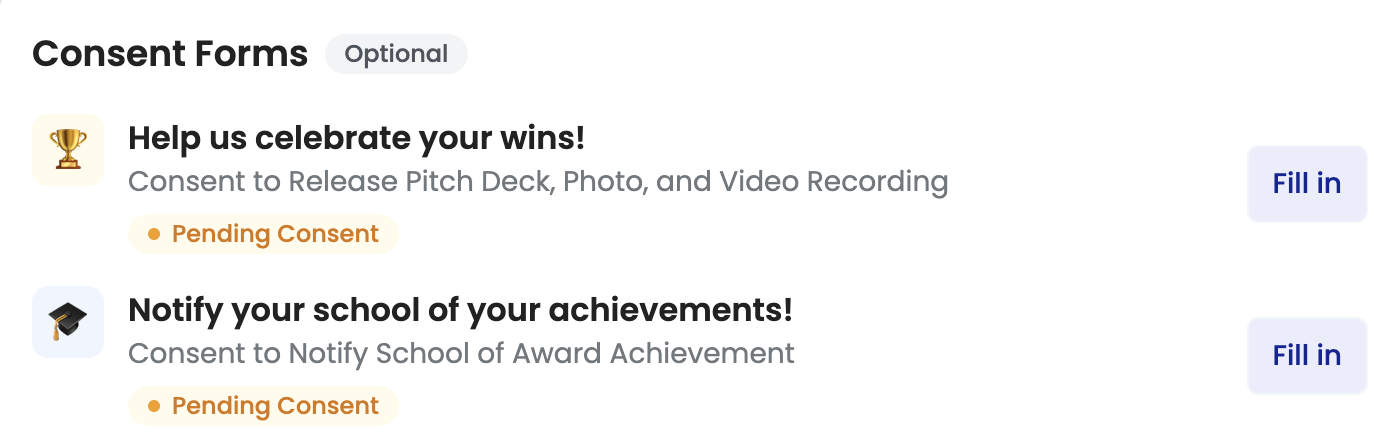
As part of our recognition program, we wish to inform your school if you receive an award. With your consent, we will share your name and the award you've won with your school. Please have your parents sign the consent form on your panel before the test so we know whether we have permission to notify your school in the event you receive an award.
3. Understand the Test Format and Scoring Video · Time allowed · Incorrect-answer penalties · Team scores
- Time Allowed:
- Lower Primary: 45 minutes
- Upper Primary, Middle School, and High School: 60 minutes
- Point value for each question is displayed at the end of each question.
Each member of the team will receive a slightly different version of the test. However, all versions will maintain the same structure, ensuring an equal distribution of easy, medium, and difficult questions.
Scoring: There is a penalty for incorrect answers. For each incorrect answer, -(point of the question)*⅓ will be deducted.
Team Scoring: Only the top two individual scores from your team will be used to calculate the team's total score.
4. Read the Academic Integrity Rules Video · Independent work · Communication · Confidentiality
Academic Integrity
- Academic Integrity Confirmation: Before submitting your test, you will be required to confirm that all work is your own and was completed independently, without assistance from other resources including but not limited to other individuals, the internet, and artificial intelligence (AI) tools.
- Cheating Detection: Our system employs algorithms to monitor and detect any instances of cheating.
- No Team Discussion During the Test: You are NOT allowed to communicate with your teammates during the test. The test must be completed independently, as you are competing not only for team awards but also for individual recognition.
- Refrain from Talking During the Test: Please refrain from any talking during the test. Even if unintentional, this may raise concerns about academic integrity and could be interpreted as a violation of test rules.
- Disqualification If Cheating Is Found: If you're found to have engaged in cheating, you will be disqualified.
Confidentiality & Fair Play
You are strictly prohibited from discussing test questions outside your team or sharing them on social media until the preliminary competition results are announced. Additionally, copying or capturing the questions in any form, including screenshots, is strictly forbidden. Any violation will result in disqualification.
Technical Difficulties
To minimize technical difficulties and help you resolve any problems quickly, please read the FAQ before beginning the test.
If a technical issue persists, do not panic. Stop working and exit the test, then email support@algoed.co as soon as possible with an explanation of the issue.
Within 24 hours, our team will review the test recording and may allow you to resume the test at another time. This option is available only when the recording supports your report of a genuine technical difficulty.
We understand that technical issues can be extremely frustrating and that you may want an answer as quickly as possible within 24 hours. However, please send only one email and allow our team time to respond, as support staff may not be online when your message is received.
Sending additional emails about the same issue will automatically reset your ticket's position in the queue and may delay our response.
Watch the Technical Difficulties Video Troubleshooting guidance
Frequently Asked Questions
What If…?
Lateness:
If you arrive late for the test, you will not be given extra time. The test will still end at the scheduled time.
Accidentally Closed the Test Tab:
You can reopen the test and resume where you left off. Your previous answers will be saved, but any time lost while the tab was closed cannot be recovered.
Internet Disruption:
If you experience an internet disruption, you can resume the test once your connection is restored. Your answers will be saved, but the lost time will not be compensated.
Accidentally Submitted the Test:
Once you submit the test, you cannot make any changes. Ensure you are ready before clicking "Confirm and Submit" on the confirmation page.
Running Out of Time:
If you do not submit your test manually, your answers will be automatically submitted when time runs out.
Before the Test…
I can't log into the competition portal.
Make sure your username and password are correct. If you forgot your password, click "Forgot Password" to reset it.
I missed my dedicated timeslot. May I join the remaining ones in other regions?
No, if you miss your designated testing time for your time zone, you will NOT be permitted to take the test at a different time.
During the Test…
Can I pause the test and resume later?
You can, BUT the lost time will NOT be compensated. The test will still end at the scheduled time: 45 minutes after the designated start time for Lower Primary, or 60 minutes for Upper Primary, Middle School, and High School.
Can I discuss with my teammates during the test?
You are NOT allowed to communicate with your teammates during the test. The test must be completed independently, as you are competing not only for team awards but also for individual recognition.
Do I have to click reset response before selecting a new answer?
No, you can directly select a new answer and it will be recorded.
Are there penalties for incorrect answers?
Yes, for each incorrect answer, -(point of the question)*⅓ will be deducted.
After the Test…
I didn't start the test on time and couldn't complete it. Will this affect my team's score?
For the team score, only the top two individual scores from your team will be used to calculate the team's total score.
I forgot to click 'Submit Test' before closing the window. Will this affect my result?
No, if you did not submit your test manually, your answers will be automatically submitted
How do I know my answers were submitted successfully?
The competition portal will show 'Submitted' if your answers have been submitted.
When will I know the results of the test?
AlgoEd will email you when your results are available. To ensure that you receive this notification, please add emails from @algoed.co to your safe-senders list and check your spam or junk folder regularly.